Upload Logo
INVOICE
Bill To
Payment Details
| Description | Qty | Price | Total |
|---|
Welcome to InvoiceGenie
Let’s set up your local environment. Data is saved on your device.
About InvoiceGenie:
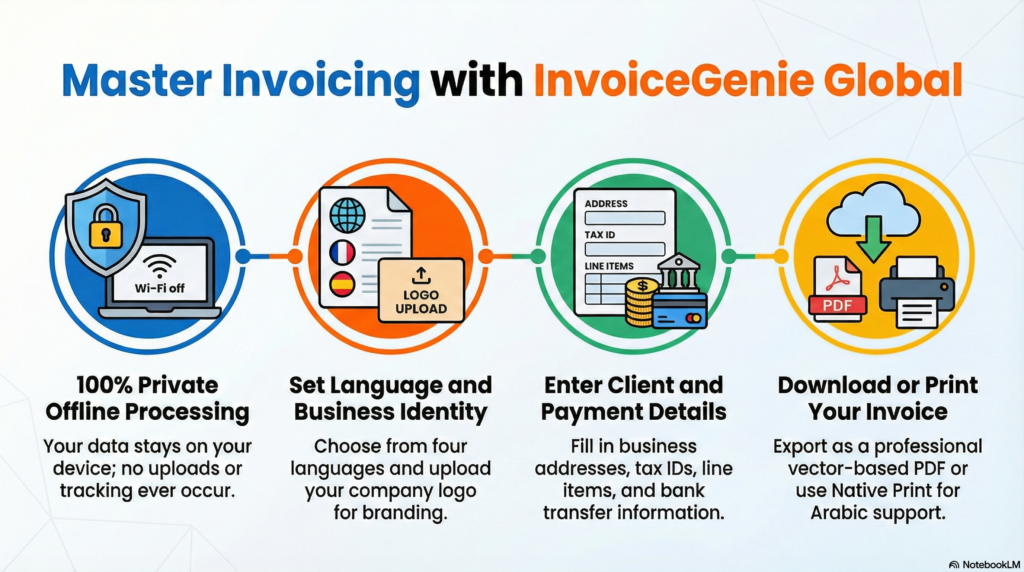
Why Choose InvoiceGenie Global?
Tired of clunky billing software that holds your data hostage? InvoiceGenie Global by ToolabX is the ultimate secure, offline invoice generator designed for freelancers, entrepreneurs, and small businesses worldwide.
🔒 100% Secure & Private (Offline Mode): Your data never leaves your device. Everything is processed locally in your browser—no cloud uploads, no tracking, and no accounts required.
🌍 Truly Global (Multi-Language & Multi-Currency): Instantly switch between English, French, German, and Arabic. We offer full Right-to-Left (RTL) support and localized currency formatting for over 15+ countries.
🎨 Brand-Ready Customization: Make it yours in seconds. Upload your company logo, choose your brand’s theme color, and generate professional, high-fidelity PDF invoices that impress clients.
💾 Save & Edit Later: Unlike other free invoice makers, InvoiceGenie lets you download an editable
.jsonfile. Load it back into the app anytime to create a duplicate or revise an old bill.⚡ Lightning Fast & Responsive: Built for speed. Generate a vector-based PDF in milliseconds or use your browser's native print function for perfect document rendering on any device.
How to Use InvoiceGenie
Creating a professional invoice takes less than a minute. Here is your quick-start guide:
Step 1: Set Your Environment Upon launching the app, select your preferred language and country. This automatically formats your currency symbols and text direction.
Step 2: Customize Your Brand Use the left sidebar to pick a theme color that matches your brand identity. Click the logo placeholder at the top of the canvas to upload your company logo.
Step 3: Fill in the Details Simply click on any text to edit it!
Update your business details and the client's information.
Add your payment details (Bank, IBAN, SWIFT).
Click "Add Line Item" to list your services, adjust quantities, and set prices. The app calculates your subtotal, tax, and grand total in real-time.
Step 4: Export and Send Done? Choose your preferred export method:
Download PDF: Generates a lightweight, professional vector PDF file.
Print / Save as PDF (Native): Best for full Arabic/RTL font rendering.
Save Editable File: Downloads a small data file to your computer so you can reload and edit this exact invoice later.
Frequently Asked Questions
Is InvoiceGenie really free to use?
Yes! InvoiceGenie is a completely free tool provided by ToolabX. There are no hidden fees, watermarks, or subscription paywalls.
How is my data kept secure if I don't create an account?
InvoiceGenie operates entirely inside your web browser using client-side processing. This means your client names, prices, and financial data are never sent to our servers. What happens on your device, stays on your device.
Can I edit an invoice after I download the PDF?
You cannot edit the PDF directly, but you can save your progress! Click the "Save Editable File" button to download a lightweight JSON file. Next time you visit ToolabX, click "Load Saved Invoice" in the top navigation bar, upload that file, and pick up exactly where you left off.
Why does the text look different when I download the PDF in Arabic?
The "Download PDF" button uses a fast, vector-based generator optimized for Latin characters. For complex scripts like Arabic, we highly recommend using the "Print / Save as PDF (Native)" button. This uses your browser's built-in engine to ensure flawless typography and RTL alignment.