Stop Wasting Lecture Time.
Start Teaching.
The ultimate Mini-LMS that automates your classroom logistics. Say goodbye to manual roll calls and paper grading. Get anti-cheat smart attendance, interactive quizzes, and instant feedback—with ZERO student passwords required.
The All-In-One Toolkit
Everything you need to run a flawless lecture.
ClassLabX eliminates friction. No apps for students to download, no passwords to forget, and no paper to grade.
Anti-Cheat Attendance
Dynamic 10-second QR codes combined with device fingerprinting. Proxy check-ins for absent friends are officially impossible.
Frictionless Quizzes
Launch live teacher-paced quizzes or scheduled async assessments. Auto-graded instantly, requiring absolutely zero student passwords.
Anonymous Feedback
Instantly gauge classroom understanding. Launch end-of-lecture satisfaction surveys to collect honest, actionable student feedback.
The Matrix Gradebook
Watch attendance records and quiz scores automatically merge into one beautiful dashboard. Apply custom weights and export to Excel in 1 click.
Simplicity First
How it works in the classroom
Launch Session
The professor clicks “Start” on their laptop. The dynamic QR code and room pin appear on the projector screen.
Students Scan
Students point their phones at the screen. They type their Student ID. No app downloads or account creation required.
Instant Reports
Data is synced to the cloud instantly. The professor closes the session and downloads a clean Excel report.
Transparent Pricing
Start free. Upgrade when you grow.
Beta Access
- Unlimited Quizzes & Attendance
- Unlimited Polls & Surveys
- Unlimited Class Rosters
- Full Matrix Gradebook & Export
- At-Risk Student Early Alerts
- No Image Uploads
Basic Educator
- Up to 3 Quizzes & Attendance
- Up to 3 Polls & Surveys
- 1 Class Roster
- Full Matrix Gradebook & Export
- At-Risk Student Early Alerts
- No Image Uploads
Pro Professor
- Unlimited Quizzes & Attendance
- Unlimited Polls & Surveys
- Unlimited Class Rosters
- Full Matrix Gradebook & Export
- At-Risk Student Early Alerts
- Image Uploads in Questions
Ready to transform your lecture hall?
Join hundreds of professors saving hours every week. Set up your first class in less than 60 seconds.
Open Portal (Access Until July 30) Claim your spot todayWelcome to ClassLabX, the premier cloud-based education and classroom management platform hosted exclusively on
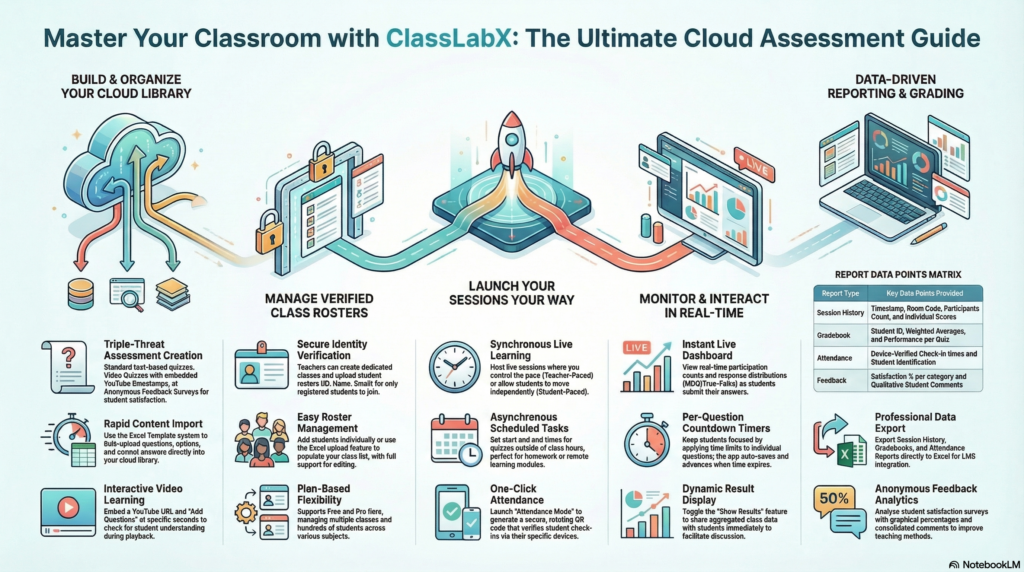
Next-Generation Quizzes: With ClassLabX, you can easily design and launch interactive quizzes in seconds. Choose from live teacher-paced quizzes, student-paced quizzes, or asynchronous video quizzes to maximize student engagement.
Anti-Fraud Attendance Tracking: Say goodbye to proxy check-ins and buddy-punching. The ClassLabX smart attendance system utilizes dynamic QR codes that refresh every 10 seconds alongside advanced device fingerprinting. This ensures that your attendance records are 100% accurate, secure, and location-verified.
Actionable Feedback Surveys: Understanding student needs is vital to educational success. ClassLabX allows you to deploy anonymous feedback surveys instantly, generating visual feedback reports that help you improve your teaching methods and adjust future quizzes.
Automated Gradebooks & Analytics: Every time you run quizzes, capture attendance, or gather feedback, ClassLabX automatically compiles the data into a unified, downloadable Excel gradebook, saving you hours of manual administrative work.
How to Use ClassLabX
Mastering your digital classroom on
Step 1: Account Setup & Class Roster Management
Before launching your first quizzes or taking attendance, you need to set up your virtual classroom in ClassLabX.
Teacher Login: Visit toolabx.com and select “Teacher Login” to create your free or Pro ClassLabX account. Complete your profile with your institution details.
Create a Class: Navigate to the “Classes” tab. Click “New Class” and give it a name (e.g., “Biology 101”).
Import Students: You can add students one by one, or save time by using the ClassLabX Excel/CSV import feature. Simply upload a spreadsheet containing student IDs and Names. This roster is crucial for restricting access to your quizzes and securely tracking attendance.
Step 2: Designing Dynamic Quizzes & Feedback Surveys
The core of ClassLabX lies in its powerful creation engine. Navigate to the “Quizzes” tab to start building.
Standard Quizzes: Select “Standard Quiz” to create traditional assessments. You can add Multiple Choice, True/False, or Short Answer questions. ClassLabX allows you to upload reference images for each question or bulk-import entire quizzes from an Excel template.
Video Quizzes: Paste a YouTube URL to create an interactive video assignment. As the video plays, you can pause it and insert questions at specific timestamps. You can even toggle “Prevent Skipping” to ensure students watch the entire video before answering the quizzes.
Feedback Surveys: Choose the “Feedback Survey” option to draft anonymous satisfaction questionnaires. You can set up 5-star rating scales and open-ended text boxes to capture student feedback effortlessly.
Step 3: Launching Live & Scheduled Quizzes
When your quizzes are ready, head to the “Launch” tab. ClassLabX offers multiple deployment methods:
Synchronous (Live) Quizzes: Launch a live room for in-class activities. Choose “Teacher-Paced” if you want to lock screens and guide the class question-by-question (perfect for live discussions), or “Student-Paced” to let them race to the finish. Project the ClassLabX QR code on the board for instant student access.
Asynchronous (Scheduled) Quizzes: Assign quizzes as homework. Set a firm Start Date, End Date, and optional time limits per question. ClassLabX will generate a direct link you can share via your LMS or email.
Step 4: Executing Anti-Fraud Attendance
Taking attendance has never been more secure. ClassLabX eliminates buddy-punching completely.
Start an Attendance Session: In the Launch tab, click “Attendance.” Select your target class and give the session a name (e.g., “Week 1 Lecture”).
The Smart QR Code: ClassLabX projects a dynamic QR code that refreshes every 10 seconds. Students scan it with their phones and enter their Student ID.
Fraud Prevention: Because the code rotates rapidly and ClassLabX logs unique device fingerprints, students cannot send screenshots to absent friends. If an unauthorized device tries to log attendance, the system blocks it.
Step 5: Collecting Anonymous Feedback
To improve your curriculum, launching feedback modules is essential.
Deploying Feedback: In the Launch tab, select “Feedback.” Students join anonymously without needing to enter their Student ID.
Live Feedback Tracking: As students submit their thoughts, the ClassLabX dashboard updates in real-time, allowing you to gauge the room’s comprehension and satisfaction immediately after delivering a lecture or administering complex quizzes.
Step 6: Analyzing Gradebooks, Attendance & Feedback Reports
The “Reports” tab is your ClassLabX command center for data analysis.
Session History: Review past quizzes, attendance logs, and feedback sessions. You can manually override auto-graded Short Answer responses here. If a student makes a slight typo, simply mark it as “Correct” and the score instantly updates.
The Automated Gradebook: ClassLabX automatically merges all your quizzes into a unified class gradebook. You can toggle between “Simple Average,” “Custom Weights,” or “Top N Scores” to calculate final grades instantly.
Attendance Tracking: View long-term attendance reports. ClassLabX automatically calculates each student’s overall attendance percentage and highlights at-risk students who drop below 75%. You can trigger automated warning emails directly from the dashboard.
Exporting Data: With one click, export your comprehensive quizzes scores, attendance sheets, and feedback analytics to Excel (.xlsx) or PDF for official school reporting.
Frequently Asked Questions
Is student data secure on ClassLabX?
Absolutely.
Can I prevent students from skipping video lessons?
Yes! Our Video Quiz mode includes a “Prevent Skipping” toggle, forcing students to watch the content before the questions appear.
How does the Anti-Fraud Attendance work?
We use Dynamic Token Rotation and Device Fingerprinting. If a student tries to check in for a friend or scans an old QR photo, the system will automatically block the attempt.
Can I export grades to my existing LMS?
Absolutely. ClassLabX allows you to export all of your classroom data—including detailed quizzes scores, long-term attendance logs, and aggregated feedback metrics—directly to an Excel (.xlsx) file, making it perfectly compatible with systems like Canvas, Blackboard, and Google Classroom.
Are the feedback surveys on ClassLabX truly anonymous?
Yes! When you launch a feedback survey through ClassLabX, student identities are hidden from the final report. This encourages highly honest feedback so you can confidently refine your future quizzes and lecture materials.